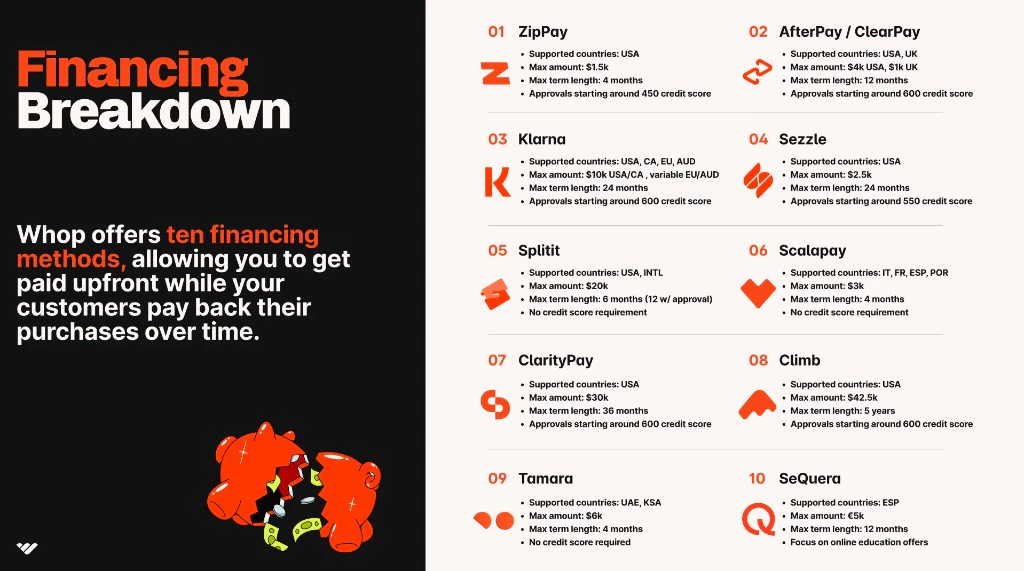
See who is eligible and how to apply to offer buy now pay later payment options at checkout.
Give your customers the flexibility to split their purchases into monthly installments while you get paid upfront. After approval, Whop automatically adds financing options to your checkout pages.
Apply for financing on your Whop dashboard. Use the Financing and other payment methods tab on the Payouts page. You can also apply while creating a checkout link on the Checkout links page.
Select + Create checkout link
Select One-time as your pricing type
Under Payment methods, select Apply for financing
Complete the application form
Whop will send an email, direct message, and Payouts page notification if it can’t accept your application or needs more information.After Whop approves your financing access, it will notify you by email, direct message, and on your Payouts page.Once accepted, all active financing options will automatically appear at customer checkout. On the Checkout links page, you can choose the financing options for each link.
Eligible categories: Financing companies can’t support gambling, sports betting, trading signals (pure education may be acceptable), credit offers, or adult content
Low dispute rate: Keep your dispute rate below 2% over 90 days
New Whop businesses must submit 90 days of statements from their previous payment processor. Submit processing statements, not bank statements. They must show total transactions and disputes.
Processing volume: At least $30,000 processed from 10+ different customers in the last 90 days
Note - if your business is in an ineligible category or has an excessive
dispute rate, Whop shows a message that you are ineligible to apply for
financing.
Financing options appear automatically on your checkout page
Customers choose their preferred provider (e.g. Klarna, Afterpay)
Whop sends customers to the financing provider for instant approval
They complete their purchase through the financing platform
You can control which financing options appear on each of your checkout links through your pricing settings.
You still receive the full payment amount (minus standard fees) while the
provider handles customer repayment. Sezzle is the exception: funds from
Sezzle orders settle on a 15-day basis before they’re available in your
balance.
Whop’s priority is to make sure you keep your financing access for the long term. Whop has the following features to help you keep your dispute rates low and keep financing active on your account:Dispute rate monitoring
View dispute rates for each financing partner on your Health report (in the Payouts section)
Alerts sent via email and Whop DM when dispute rates hit warning levels:
Klarna: warning at 0.5% dispute rate on Klarna transactions
All others: warning 1% dispute rate on any other BNPL option
When you receive an alert, take extra precautions to prevent further disputes.
Set clear return policies, refund angry customers, and make sure your
customers know where to go to resolve issues so they don’t dispute directly
with the bank.
Splitit minimum balance (Splitit only)
Whop holds 15% of every Splitit transaction in your balance for 180 days
This shows Splitit that you can cover any potential disputes
Track your Splitit balance and release dates on your Balance page
Stay under these thresholds to keep your financing access:
Klarna: Under 1% dispute rate
All other providers: Under 2% dispute rate
Whop automatically revokes financing access if your financed transactions hit these dispute rate thresholds. Whop will email you about the lost access.
1. Check the maximum product price for the BNPL option
Each financing provider has different maximums, which can depend on customer geographies and risk profiles. Read the Financing options article for a full overview of each BNPL maximum.
Each financing provider supports certain geographies based on the customer’s location. If you send a checkout link to a customer in an unsupported geography, the BNPL option won’t appear at checkout.
Whop’s financing providers (Splitit, Klarna, Sezzle, Afterpay, and Zip Pay) don’t support certain product or service categories. A business in one of these categories can’t use financing on Whop.
Adult, Gambling & Dating: Adult entertainment or pornography, escort services, gambling, gaming, raffles, lotteries, dating, or matchmaking services.
Financial Services & High-Risk Lending: This category includes banks, credit unions, mortgage lenders, non-bank finance companies, factoring, and purchase order financing. It also includes money services businesses, payroll companies, securities or commodities dealers or brokers, and investment opportunities or advice. Collection agencies, debt buyers, credit repair, debt relief, identity theft protection, and bail bonds also belong to this category.
Regulated & Prohibited Products: Firearms, guns, ammunition sales or manufacturing, drug paraphernalia, dispensaries, medical marijuana, nutraceuticals, unverified health or weight loss products, precious metals, and counterfeit goods.
Subscription & Service-Based Restrictions: Discount travel clubs or subscriptions, magazine subscriptions, video rental services, timeshares, and fractional ownership. This category also includes real estate brokers, agencies, consultants, lessors, property managers, and contracted management services.
Miscellaneous High-Risk Businesses: Government, nonprofit, charitable, or religious organizations. This category includes social networking sites, sports forecasting, flea markets, fortune telling, astrology, horoscopes, mining, farming, energy generation or distribution, and logistics and freight forwarding. It also includes liquidation companies, manufactured or mobile home dealers, massage services, future service liability beyond one year, and products or services with unreasonable guarantees or claims.
If you’re unsure whether your product or service is eligible for financing, please contact Whop support before applying for financing.
Make sure you haven’t exceeded a 2% dispute rate across transactions for the BNPL option (1% for Klarna). If you exceed the acceptable rate, Whop automatically removes that option from checkout. Whop will notify you by email and direct message.
Assistant
Responses are generated using AI and may contain mistakes.