> ## Documentation Index
> Fetch the complete documentation index at: https://docs.whop.com/llms.txt
> Use this file to discover all available pages before exploring further.
# Payout methods
> Add and manage how you receive payouts
Payout methods are the bank accounts or other destinations where Whop sends your earnings.
## Payout options
Whop supports payouts to your bank account, mobile wallet, or crypto wallet in over 200 countries. Depending on your country, all eligible payout methods will show up on the modal when you go to withdraw from the **[Balances](https://whop.com/dashboard/balance/)** page of your Whop dashboard. Different countries are eligible for different payout options.
In addition to standard payouts (which take up to 5 business days), you can also withdraw your balance via **instant payout methods** (take only a few minutes). Instant payouts let you access and withdraw your pending funds, meaning payments that have not yet fully settled in your Whop balance.
Some withdrawals may need to go through compliance review based on different
risk factors. While Whop's payout reviews take less than 30 minutes, we will
not show you the Instant payout option if the payout will have to go through
review (since it will not actually be instant).
## Add a payout method
1. Go to your **Dashboard** > **Balances** > **Payout methods**
2. Click **Add payout method**
3. Enter your bank details or connect via the supported flow
4. Confirm and set as default if you want new payouts to use it
You can have multiple payout methods and choose which one to use per payout in some cases.
## International payouts
Creators outside the US need to set up a bank account that accepts the currency of their registered country.
On Whop Payments, Whop is the *Merchant of Record*, and our system automatically converts all currencies to the currency of the geography you initially chose when you set up your Whop organization.
* Even if you accept payments in USD, Whop automatically converts the USD payments to your local currency before sending payouts
* Payouts will NOT successfully go through to a USD-accepting bank account if the bank account is located in a country where USD is not the local currency
Your payout country can be changed for an existing Whop. To switch payout
countries, navigate to your payouts and click the 3 dots on the top right,
then click **Change payout country**.
## PayPal payouts
To receive PayPal payouts, customers must buy using PayPal (no post-purchase transfer to PayPal).
### Setting up payouts to your PayPal
1. Go to your **Dashboard** > **Balances** > **Additional payment methods**
2. Select **Setup** next to the **PayPal** option
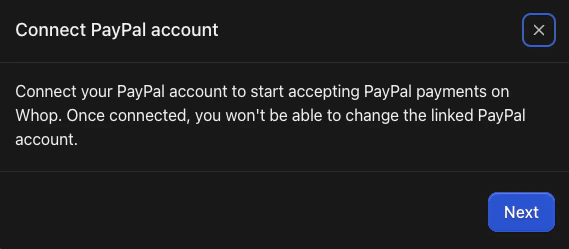
3. Follow the on-screen instructions to link your PayPal account
For PayPal to appear at checkout, check the PayPal box under Payment options
when you create a checkout link.
 ## Coinbase payouts
**Important notes:**
* Withdrawals must go to a Coinbase wallet
* To receive Coinbase payouts, customers must buy using crypto (no post-purchase transfer to Coinbase)
### Setting up payouts to your Coinbase crypto wallet
1. Go to your **Dashboard** > **Balances** > **Additional payment methods**
2. Select **Setup** next to the **Coinbase** option
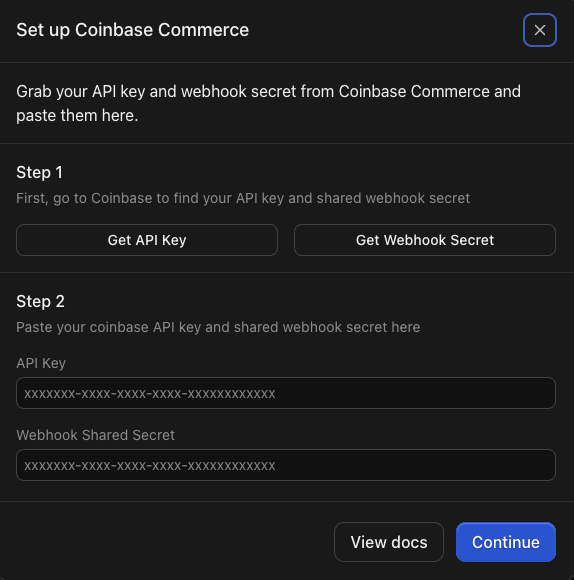
3. Follow the on-screen instructions to link your Coinbase Commerce account
4. You will need to log into your Coinbase account and copy your API key and Webhook secret to paste into Whop
**For Coinbase to appear at checkout:** Check the **Crypto** box under **Payment options** when you create a checkout link.
To get paid with crypto, you have to set up a one-time pricing plan.
## Coinbase payouts
**Important notes:**
* Withdrawals must go to a Coinbase wallet
* To receive Coinbase payouts, customers must buy using crypto (no post-purchase transfer to Coinbase)
### Setting up payouts to your Coinbase crypto wallet
1. Go to your **Dashboard** > **Balances** > **Additional payment methods**
2. Select **Setup** next to the **Coinbase** option
3. Follow the on-screen instructions to link your Coinbase Commerce account
4. You will need to log into your Coinbase account and copy your API key and Webhook secret to paste into Whop
**For Coinbase to appear at checkout:** Check the **Crypto** box under **Payment options** when you create a checkout link.
To get paid with crypto, you have to set up a one-time pricing plan.