> ## Documentation Index
> Fetch the complete documentation index at: https://docs.whop.com/llms.txt
> Use this file to discover all available pages before exploring further.
# Pay your team
> Learn how to pay your team members through Whop.
Pay your team directly from your Whop balance. Payments are instant and your team can cash out to their bank.
There's a 3% fee for all team payments.
## Pay your team through your Dashboard
1. Go to **Dashboard** → **Team**.
2. Click the **Pay** button next to the person you want to pay.
3. Enter the amount you want to send.
4. Select the **Balance** you'll send the payment from.
5. Add a note (optional).
6. Click **Send** to send it.
The total amount you send includes the 3% fee.
When you send it, your team member gets an email and a DM notification. They can then go to **Profile** → **Balance** to cash out.
 ## Pay your team through their profile
You can also send money to any Whop user through their profile — even if they're not on your team.
1. Click the user's profile picture.
* If you know their username, go to their profile by entering **whop.com/@\[username]** in your browser (e.g. **whop.com/@George**).
## Pay your team through their profile
You can also send money to any Whop user through their profile — even if they're not on your team.
1. Click the user's profile picture.
* If you know their username, go to their profile by entering **whop.com/@\[username]** in your browser (e.g. **whop.com/@George**).
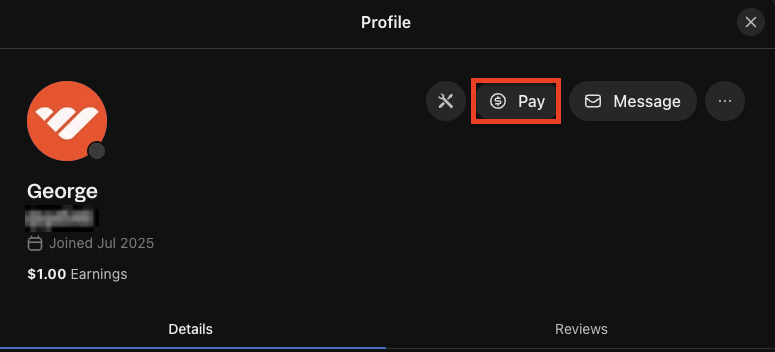 2. On their profile, click the **Pay** button next to **Message**.
3. Fill out the payment details:
* **Enter amount:** Type how much you want to send.
* Select the **Balance** you'll send the payment from.
* **Write a note:** Add a note (optional).
4. Click **Send** to send the money.
They'll receive an email and message notification, and can cash out through **Profile** → **Balance**.
2. On their profile, click the **Pay** button next to **Message**.
3. Fill out the payment details:
* **Enter amount:** Type how much you want to send.
* Select the **Balance** you'll send the payment from.
* **Write a note:** Add a note (optional).
4. Click **Send** to send the money.
They'll receive an email and message notification, and can cash out through **Profile** → **Balance**.