> ## Documentation Index
> Fetch the complete documentation index at: https://docs.whop.com/llms.txt
> Use this file to discover all available pages before exploring further.
# Affiliate program
> Learn how to set up an affiliate program for your whop
Set up your affiliate program to automatically pay commissions when someone refers a new paying member to your whop.
## How the affiliate program works
When someone uses a referral link to join your whop and makes a purchase, the person who referred them earns a commission.
Here's how it works:
* You turn on the affiliate program
* Users get access to their unique affiliate link for your whop
* They share their link anywhere they want
* When someone joins through their link, Whop automatically tracks the referral and pays the commission
* You can customize commission rates anytime to fit your business model
## How to set up your affiliate program
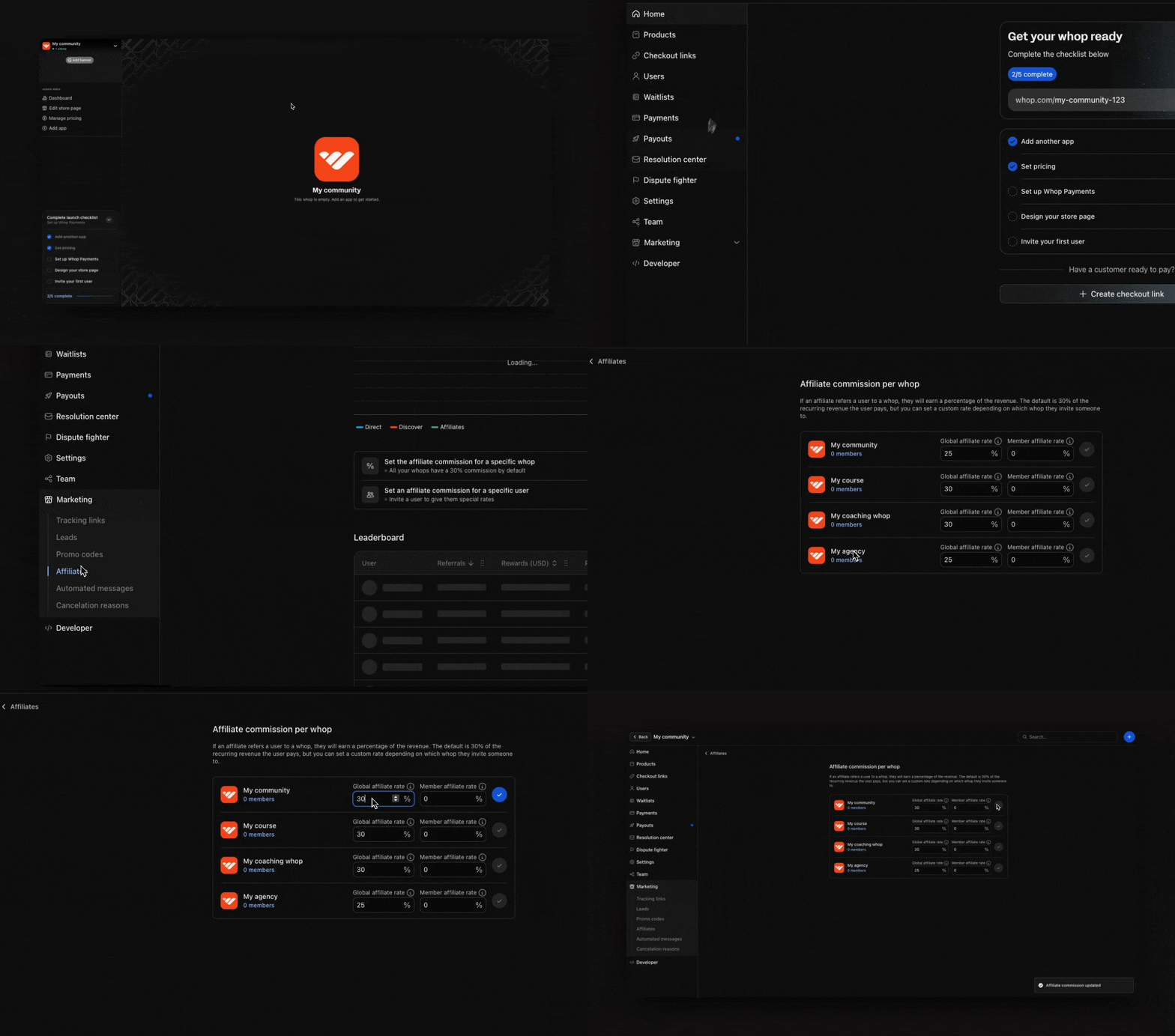
To find your affiliate program:
1. Go to your **Dashboard**
2. Make sure you're viewing the correct whop using the selection modal at the top left
3. Click the **Marketing** dropdown
4. Select **Affiliates**
1. Click **Set the affiliate commission for a specific whop**
2. You'll see all your whops with two key settings:
* **Global affiliate rate:** This is the commission rate offered to any user who refers others to your whop. The default is 30%, but you can adjust it to any percentage you prefer
* **Member affiliate rate:** This is the commission rate specifically for your existing members who refer others. This allows you to reward your community differently than general affiliates (e.g. members get 50% commission while the global rate is 30%)
If you set the 'Member affiliate rate' to 0%, members will earn the global affiliate rate instead.
After making changes, click the blue tick button to confirm your new rates.
 ### How to create custom rates for partnerships
For special partnerships or top performers, you can create custom commission structures:
1. Click **Set an affiliate commission for a specific user**
2. Enter the user's Whop account email address
3. Configure their reward:
* Choose between **Percent** and **Fixed amount**
* Select **Recurring payments** (ongoing commissions) or **First payment** (one-time commission)
* Select which whops this rate applies to
4. Click **Invite** to send them an invitation
## Payment timing
Whop automatically handles all affiliate payments for you. There is a 30-day waiting period between when a referred customer makes their purchase and when the affiliate receives their commission.
### How to create custom rates for partnerships
For special partnerships or top performers, you can create custom commission structures:
1. Click **Set an affiliate commission for a specific user**
2. Enter the user's Whop account email address
3. Configure their reward:
* Choose between **Percent** and **Fixed amount**
* Select **Recurring payments** (ongoing commissions) or **First payment** (one-time commission)
* Select which whops this rate applies to
4. Click **Invite** to send them an invitation
## Payment timing
Whop automatically handles all affiliate payments for you. There is a 30-day waiting period between when a referred customer makes their purchase and when the affiliate receives their commission.